
Bedtime Listening
Need a bedtime reader app that stops on its own?
Sleep timer is one of the most practical search intents in text to speech. It matters because bedtime listening is about comfort and continuity, not fighting the phone while tired.
Trusted by 10M+ Google Play downloads · 4.3★ on Google Play
Use the direct APK on de-Googled, GrapheneOS, emulator, or Play-free devices. The universal APK is the safest default build.
What makes a good bedtime reading app
Without a sleep timer and proper long-form playback controls, bedtime listening becomes annoying. You either wake the screen repeatedly or lose your place when you fall asleep.
How @Voice handles sleep-friendly playback
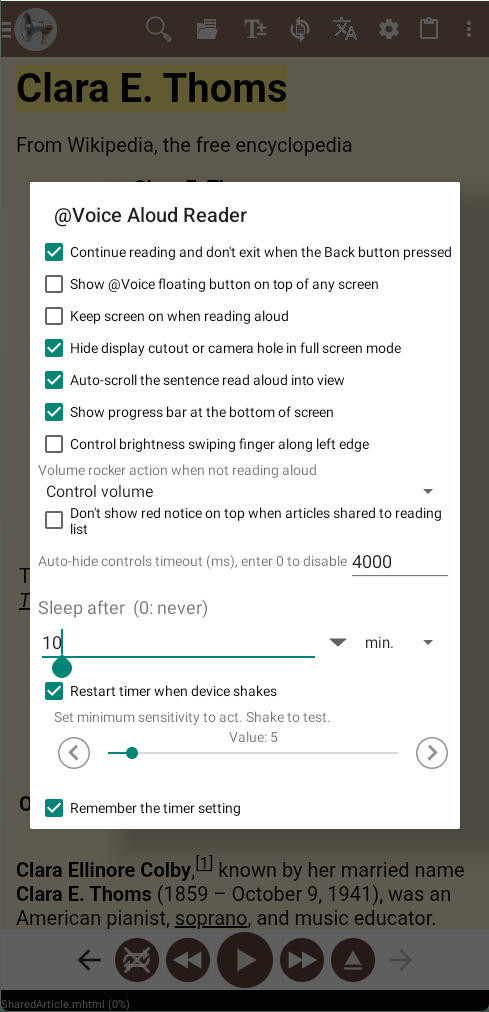
@Voice includes a configurable sleep timer, long-form resume behavior, bookmarks, queue controls, and hands-free playback features that make it a practical bedtime reader.
What @Voice already supports: The app feature set includes sleep timer options from short to long intervals, auto-advance across chapters or articles, history, and headset-friendly controls.
Setting a timer and keeping your place
- Open the book, article, or saved reading list you want to hear before sleep.
- Set the sleep timer for the amount of time you want the app to keep speaking.
- Resume later from your saved place, or use a bookmark if you want a precise stopping point.
Bedtime tips that make @Voice more useful
The sleep timer matters, but bedtime listening also depends on gentle resume behavior and not losing your place when you drift off.
- Use a slower pace or a calmer voice profile for bedtime than you would use for study or commuting.
- Drop a bookmark before you start if the exact stopping point matters more than rough resume position.
- Pair the timer with chapter-based or list-based content when you want the session to end cleanly instead of mid-navigation.
Why it works better than a plain TTS demo
- Works for novels, essays, fan fiction, and saved article queues.
- Avoids keeping the screen active longer than needed.
- Makes sleep listening less disruptive because the app can stop itself cleanly.
- Pairs well with voice selection, pace adjustment, and hands-free controls.
Screenshot Placeholder
Replace this block with a real app screenshot before publishing.Capture the sleep-timer settings or menu option, plus a second screenshot showing a long-form book or article in playback.
Common questions about Sleep Timer Reader
Will @Voice remember where I stopped?
Yes. Resume behavior, bookmarks, and history are part of the app's longer-form reading workflow.
How long can the sleep timer run?
The app supports practical short and longer sleep-timer intervals for bedtime listening.
Will @Voice resume near the place where the timer stopped?
Yes. Resume behavior and bookmarks help you pick up again after the timer ends.
Does the timer work across chapters or queued articles?
Yes. It is part of the broader playback system, not just a one-page feature.
Can I install it without Google Play?
Yes. Use the direct APK from Hyperionics.
Install @Voice and try it now
If this is the workflow you were looking for, install @Voice Aloud Reader and test it with your own content in a minute or two.
Learn more on the @Voice site