
Hands-Free Playback
Need a reader app you can control from a headset or Bluetooth device?
Hands-free control is what separates a useful reading app from a desktop-style demo. @Voice pays attention to those details because many users listen while walking, driving, cleaning, or working.
Trusted by 10M+ Google Play downloads · 4.3★ on Google Play
Use the direct APK on de-Googled, GrapheneOS, emulator, or Play-free devices. The universal APK is the safest default build.
Why hands-free control matters in daily listening
A read-aloud app is far less useful if it forces constant screen interaction. Search users often need reliable play, pause, skip, and bookmark control from their headset or car hardware.
How @Voice works with real headset and Bluetooth use
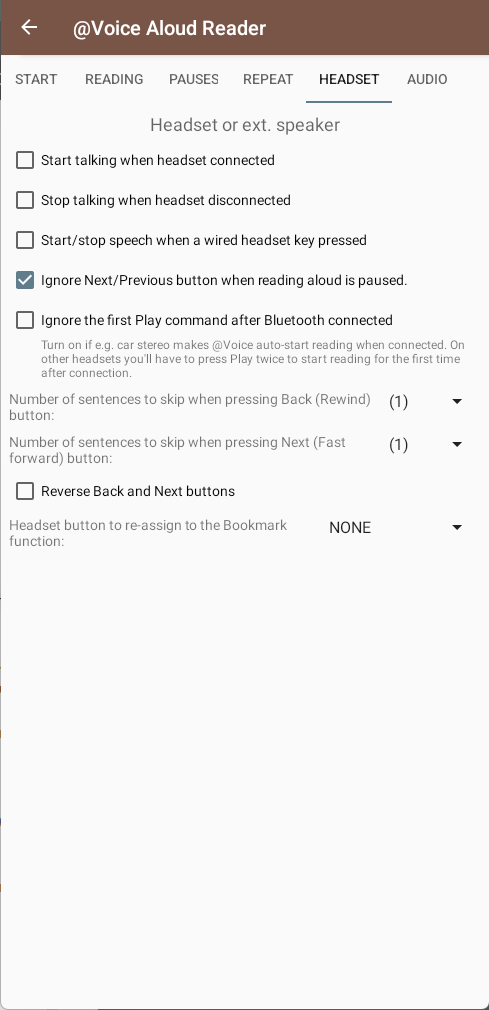
@Voice supports wired and Bluetooth media controls, optional bookmark placement from a headset button, connection-triggered behavior, and audio-routing settings that help in real device setups.
What @Voice already supports: Current features include media-button handling, headset connect and disconnect behavior, bookmark-on-button options, Bluetooth fade workarounds, and stream-selection settings.
A clean hands-free setup
- Open the content you want to hear and start playback in @Voice.
- Enable the headset or Bluetooth behaviors that fit your hardware setup.
- Use media buttons for play, pause, next, back, and even bookmarks where configured.
Situations where headset control matters most
Hands-free control is what turns read-aloud from a desk demo into something you can really use while moving, working, or resting your eyes.
- Walking, commuting, workouts, and chores are all easier when play, pause, and skip live on hardware buttons.
- Bookmark-on-button features matter when you notice something important but do not want to look at the phone.
- Odd Bluetooth hardware sometimes needs extra settings, which is why @Voice exposes more control than simpler apps do.
Why it helps when you cannot keep touching the screen
- Useful for walks, commutes, housework, workouts, and low-vision workflows.
- Reduces the need to wake or unlock the phone while listening.
- Includes advanced handling for odd Bluetooth quirks on some devices.
- Pairs naturally with reading lists, sleep timer, and long-form book listening.
Screenshot Placeholder
Replace this block with a real app screenshot before publishing.Capture the headset or playback settings screen, and optionally a photo or mockup showing @Voice being controlled from headset buttons.
Common questions about Hands-Free Reader
Can @Voice use Bluetooth media buttons?
Yes. That is one of the features called out in the current app materials.
Can I play, pause, and skip from Bluetooth buttons?
Yes. Media-button handling is one of the core hands-free features in @Voice.
Can I drop bookmarks without unlocking the phone?
Yes. Certain headset-button workflows can be used for bookmarks.
What if my headset or car has odd Bluetooth behavior?
The app includes extra Bluetooth-related settings and workarounds for those real-device quirks.
Can I install it without Google Play?
Yes. Use the direct APK from Hyperionics.
Install @Voice and try it now
If this is the workflow you were looking for, install @Voice Aloud Reader and test it with your own content in a minute or two.
Learn more on the @Voice site