 Удар · Udar
Russian pronunciation / For Android
Give Russian words
their intended voice.
Prepare your text for reading aloud. Udar restores ё, chooses word stress in context, and helps a speech engine read Roman numerals correctly.
Open a Russian TXT, HTML or EPUB file, then share the prepared copy with @Voice Aloud Reader or another compatible reading app. Your original stays unchanged.
Version 1.1 · Android 8.0 or later · English and Russian interface
Offline dictionaries need no account. Optional cloud models use your own API key and may incur provider charges.
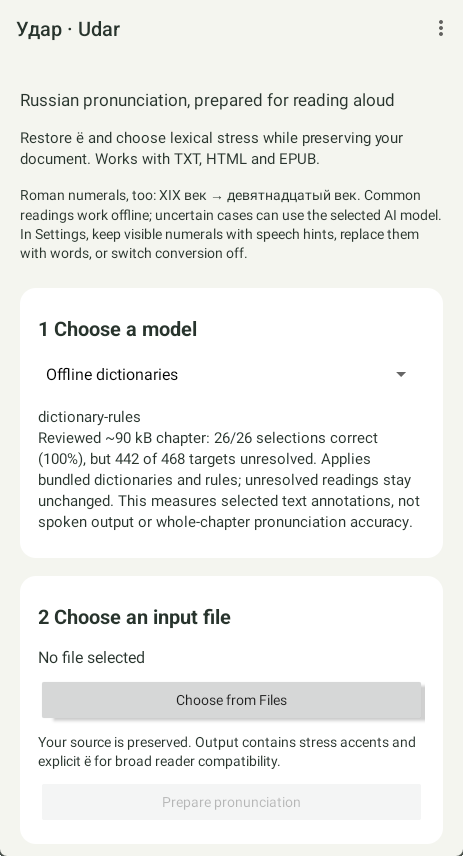
Tap the screenshot to enlarge.
Why Udar?
The spelling alone
doesn’t tell the story.
Written Russian usually leaves out stress marks and often prints е in place of ё. The same spelling can represent different meanings. A voice needs context to choose the right pronunciation.
Udar uses bundled dictionaries and reviewed phrase and grammar rules. With a cloud model selected, unresolved words and their surrounding sentences go to that model to choose among dictionary readings.
A few examples
- все
- Все гости пришли.Всё готово.
- замок
- Старинный за́мок.Дверной замо́к.
- в XIX веке
- в девятнадцатом веке
Udar adds explicit ё and acute stress accents to the output. Roman numerals can keep their appearance while carrying speech hints.
From document to listening
A prepared copy in four steps.
Choose a model
Offline dictionaries run on your device, free and without an internet connection. They leave unresolved ambiguities unchanged. For more contextual choices, select a cloud model, add that provider’s API key, and check its description and cost information.
Choose your file
Use Android Files to open TXT, HTML, HTM, XHTML or EPUB. Udar makes a private copy and preserves the source. EPUB processing keeps the book’s structure.
Prepare pronunciation
Start processing and follow the progress. You can use another app or turn the screen off; enable notifications for the completion alert. If processing is interrupted, return to Udar and use Resume.
Share or save the result
Review the summary, then share the completed file with @Voice or save a copy to a folder. Listen with your chosen Russian voice and review any important passages.
In the three-dot menu
Match the output
to your reader.
Open Settings to change speech hints, Roman numeral output or the interface language. Help explains the app; About includes detailed help, open source notices and dictionary credits.
Roman numerals
Common Russian readings, including centuries and monarchs, work locally and offline. Uncertain cases use the selected cloud model, or stay unchanged offline.
By default, HTML and EPUB preserve visible numerals and add @Voice speech aliases, which need a compatible @Voice version. Choose Replace numerals with spoken words for other readers, or turn conversion off. TXT uses words in either enabled mode.
Phoneme hints for е/ё
Optional SSML hints provide phonetic spelling for ambiguous е readings that a voice might otherwise pronounce as ё. They are on by default and require support from both reader and voice. Turn them off if the reader speaks the tags or cannot interpret them. TXT output includes literal markup when hints are enabled.
English or Russian interface
Follow the system language or choose English or Russian. This changes the app’s screens and help, while the document being prepared remains Russian.
Models and your text
Start offline.
Add AI when you need it.
Offline processing stays on your device. Cloud processing requires internet access and sends context sentences and pronunciation options directly to the selected provider. That provider’s billing and retention rules apply. API keys are encrypted on the device; no key is included in the APK.
Pronunciation depends on your reading app and voice. Udar covers its dictionary vocabulary, and contextual decisions can be wrong. It does not add correct stress to every Russian word. Existing ё and stress marks in the source take priority.
Processed HTML and EPUB include hidden processing information, such as the model, settings and estimated cost. It contains no source text, API key or device path, but anyone inspecting the output file can read it.
Try it with @Voice
Hear the difference in context.
A short Russian sample puts both meanings of words such as все, осел, мел, замок and мука into separate sentences, followed by two Roman numeral examples. Open it in @Voice, then prepare it with Udar and listen to the result with the same voice.
The reference is marked by hand to show the intended readings; it is not a claim that every model will produce the same result.
Help us improve Udar
Tell us how it reads.
Comments, suggestions or a word that sounds wrong? Send your feedback to atVoice@hyperionics.com. If possible, include a short example sentence, the selected model, and the reader and voice you used.
Удар · Udar for Android
Download APKAfter downloading, open the APK on your Android device. If prompted, allow installation from the browser or Files app used to open it.