 @Voice Aloud Reader
Why scanned PDFs fail in normal TTS apps
Scanned PDFs are often unreadable by normal TTS apps because there is no clean text layer, or the extracted order is wrong. Two-column layouts, footnotes, headers, and tables make the speech output worse.
OCR PDF Workflow
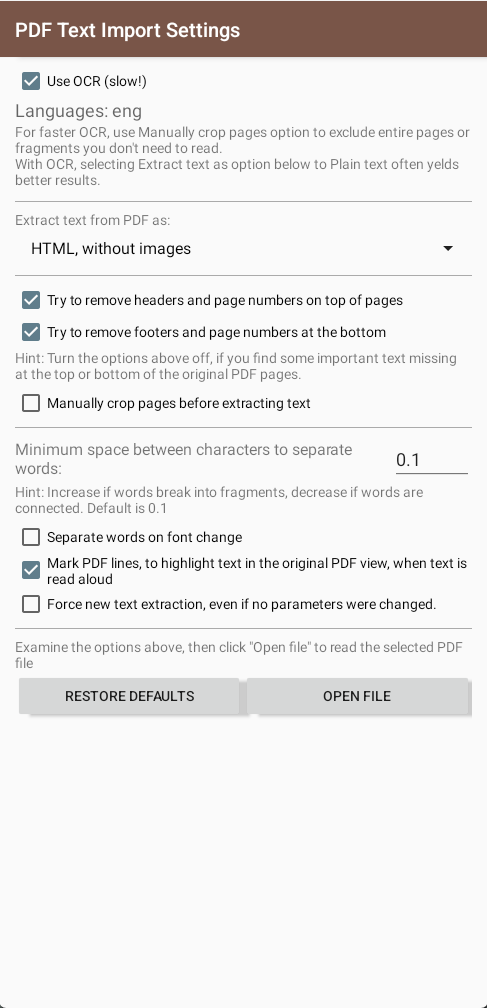
Scanned pages and complex columns can make PDF reading awkward. This guide covers @Voice's PDF and OCR options for recognizing text and checking its reading order.
Trusted by 10M+ Google Play downloads · 4.3★ on Google Play
Use the direct APK on de-Googled, GrapheneOS, emulator, or Play-free devices. The universal APK is the safest default build.
Scanned PDFs are often unreadable by normal TTS apps because there is no clean text layer, or the extracted order is wrong. Two-column layouts, footnotes, headers, and tables make the speech output worse.
@Voice supports OCR-aware PDF workflows and gives you manual control over extraction regions. That means you can define what text should be captured and in what order.
The PDF tools matter most when the page contains the wrong text order or too much junk around the text you actually want to hear.
Yes. That is one of the clearest use cases for its manual crop and extraction-order tools.
Yes. That is one of the clearest cases for its region selection and ordered extraction tools.
Not always. Many documents are readable immediately, and the manual tools are there for the pages where automatic extraction is not good enough.
Yes. That is exactly the kind of cleanup the crop workflow helps with.
Yes. Use the direct APK from Hyperionics.
If this is the workflow you were looking for, install @Voice Aloud Reader and test it with your own content in a minute or two.