 @Voice Aloud Reader
What makes PDF listening tricky
Many PDF tools expose speech as an afterthought. They may read badly ordered text, fail on longer documents, or make it hard to move between the spoken text and the original page layout.
PDF Listening
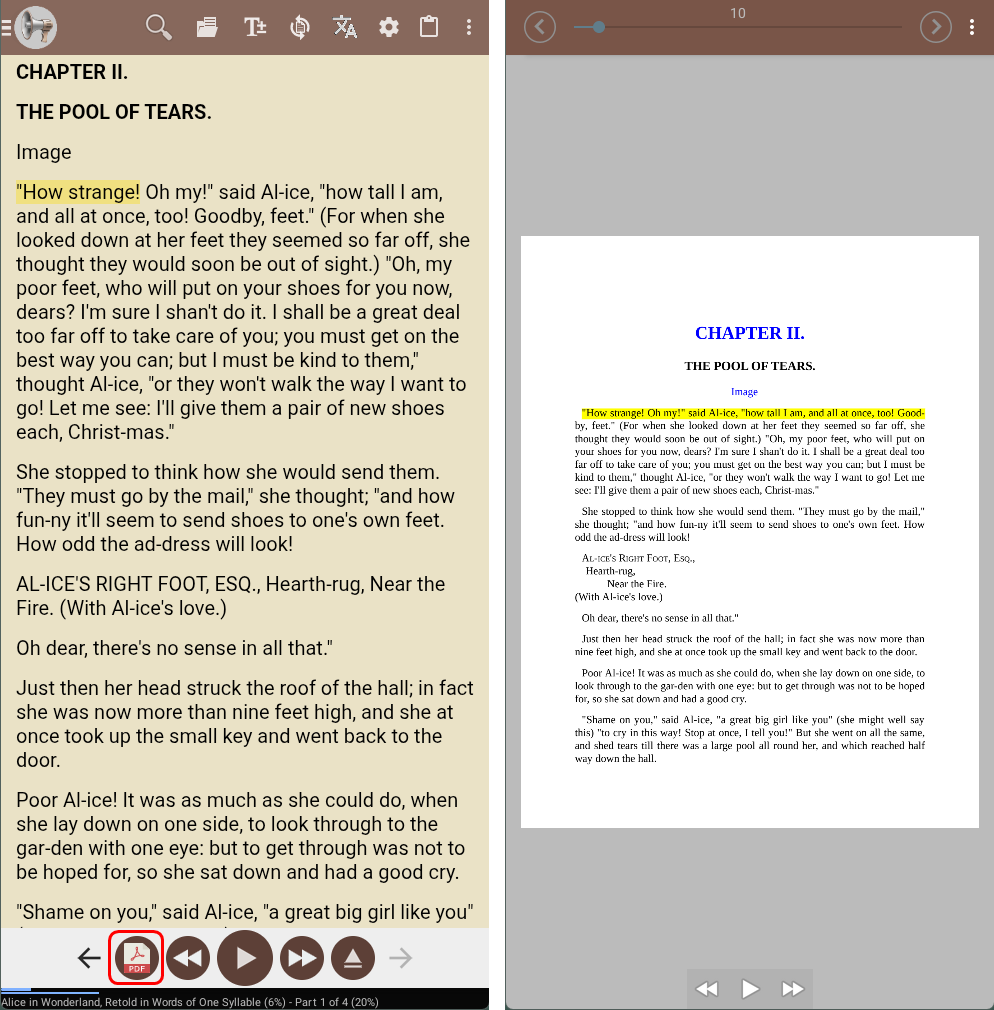
Open a PDF in @Voice and listen to its text. The controls below help you move through the document and handle pages that need extra attention.
Trusted by 10M+ Google Play downloads · 4.3★ on Google Play
Use the direct APK on de-Googled, GrapheneOS, emulator, or Play-free devices. The universal APK is the safest default build.
Many PDF tools expose speech as an afterthought. They may read badly ordered text, fail on longer documents, or make it hard to move between the spoken text and the original page layout.
@Voice opens PDFs for read-aloud workflows, extracts text for smoother speech, and can jump from the spoken sentence back to the matching page and area in the original PDF view.
A little setup goes a long way with PDFs, especially when the visual layout is more complicated than the reading order you want to hear.
Yes. It is intended for serious listening workflows, including long-form PDFs where progress, bookmarks, and navigation matter.
Yes. The PDF workflow is designed so you can move between the spoken text and the original page view.
Long-form navigation is one of the reasons @Voice is a better fit than a basic PDF viewer with a token speech button.
That is where the dedicated PDF crop and region-order tools become useful, especially on dense or academic layouts.
Yes. Use the direct APK from Hyperionics.
If this is the workflow you were looking for, install @Voice Aloud Reader and test it with your own content in a minute or two.