Use the direct APK on de-Googled, GrapheneOS, emulator, or Play-free devices. The universal APK is the safest default build.
Why dyslexia-friendly reading needs more than a generic voice button
People searching for dyslexia-friendly text to speech usually need more than any voice button. They want to hear the text, follow it visually, and keep their place without fighting cramped layouts.
How @Voice supports audio-follow reading
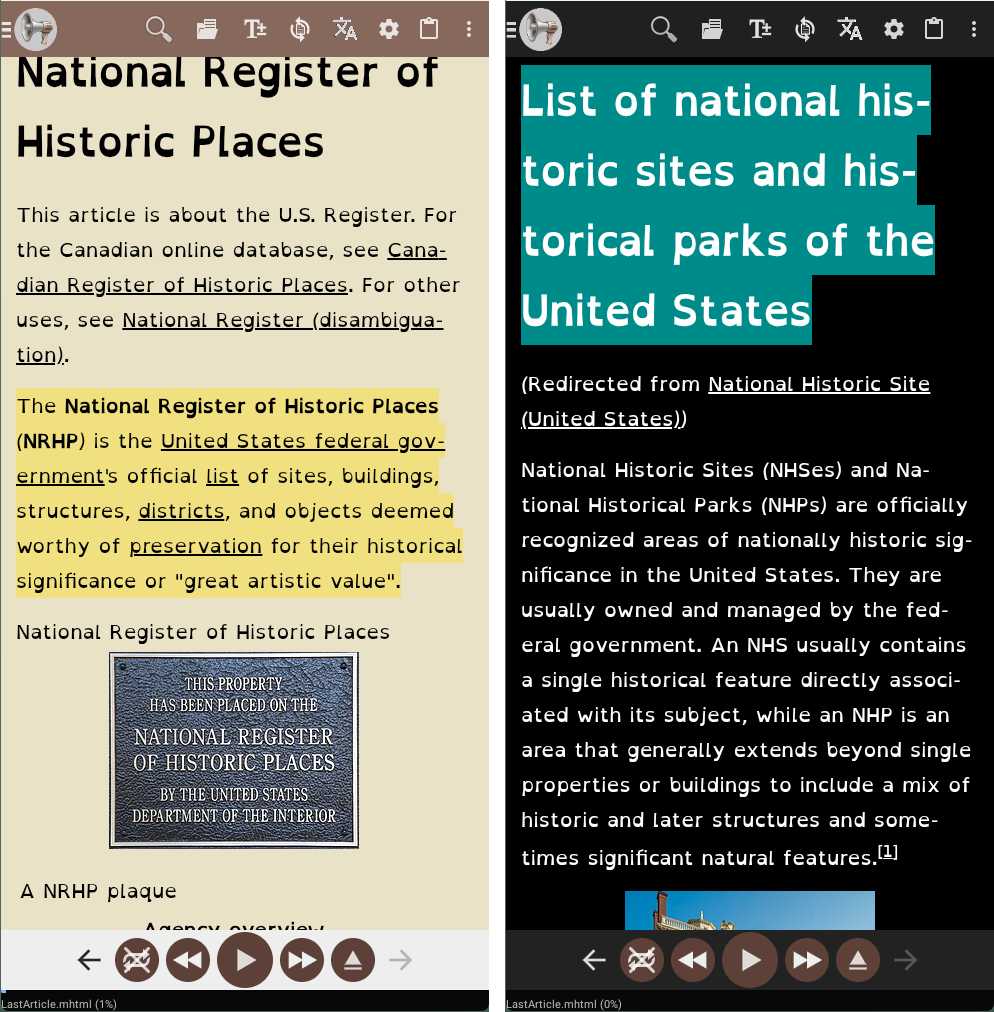
@Voice combines read aloud with OpenDyslexic font, independent text-size control, high-contrast colors, sentence review, and word highlighting when supported so listening and following can work together.
What @Voice already supports: Current accessibility features include TalkBack support, OpenDyslexic font, larger text, high-contrast color control, sentence-by-sentence review, and word highlighting when supported.
A comfortable dyslexia-friendly setup
Open a web page, document, or book in @Voice.
Switch to a more readable font, larger text size, and colors that feel calmer on your eyes.
Listen with highlighting on so the audio and text can reinforce each other.
Settings that matter most for dyslexia-friendly reading
The best setup is usually a combination of audio and a calmer visual layout, not one feature by itself.
Try OpenDyslexic or another clearer font first, then raise text size until line tracking feels easier.
Use highlighting when supported so the spoken sentence and the on-screen position reinforce each other.
Pick lower-glare or higher-contrast colors based on what reduces strain for you, not what looks standard.
Why it works for longer reading sessions
Helps reduce the burden of decoding every line visually.
Lets you pair audio with clearer on-screen text instead of choosing one or the other.
Works across web pages, documents, and ebooks instead of one content type only.
Fits both short reading tasks and longer study or book sessions.
See it in @Voice
Example @Voice Aloud Reader screen for Text to Speech for Dyslexia.Click the screenshot to enlarge it.
Common questions about Text to Speech for Dyslexia
Does @Voice include an OpenDyslexic font?
Yes. Current @Voice feature documentation includes OpenDyslexic as one of its accessibility reading options.
Can I listen and follow the text at the same time?
Yes. That is one of the most practical @Voice workflows when highlighting and readable display settings are turned on.
Can I make the text larger and change colors without changing my whole phone?
Yes. @Voice includes independent text-size control and custom color combinations for the reading view.
Does this work only for plain text, or also for web pages and PDFs?
It can help across web pages, documents, PDFs, and ebooks because the accessibility tools are part of the reader itself.
Can I install it without Google Play?
Yes. Use the direct APK from Hyperionics.
Install @Voice and try it now
If this is the workflow you were looking for, install @Voice Aloud Reader and test it with your own content in a minute or two.
 @Voice Aloud Reader