 @Voice Aloud Reader
Why people record TTS instead of only streaming it live
A lot of TTS apps speak only in real time. That is limiting if you want to build an offline library, share a recording with yourself, or keep a durable version of a long article or document.
TTS Recording
Record spoken text from @Voice to an audio file for later listening. Choose the output format and recording options that suit the material.
Trusted by 10M+ Google Play downloads · 4.3★ on Google Play
Use the direct APK on de-Googled, GrapheneOS, emulator, or Play-free devices. The universal APK is the safest default build.
A lot of TTS apps speak only in real time. That is limiting if you want to build an offline library, share a recording with yourself, or keep a durable version of a long article or document.
@Voice can record spoken output into audio formats such as MP3, OGG, and WAV, with options suited to practical long-form listening workflows.
Recorded speech is useful when you want the convenience of audio without depending on reopening the original article, book, or document every time.
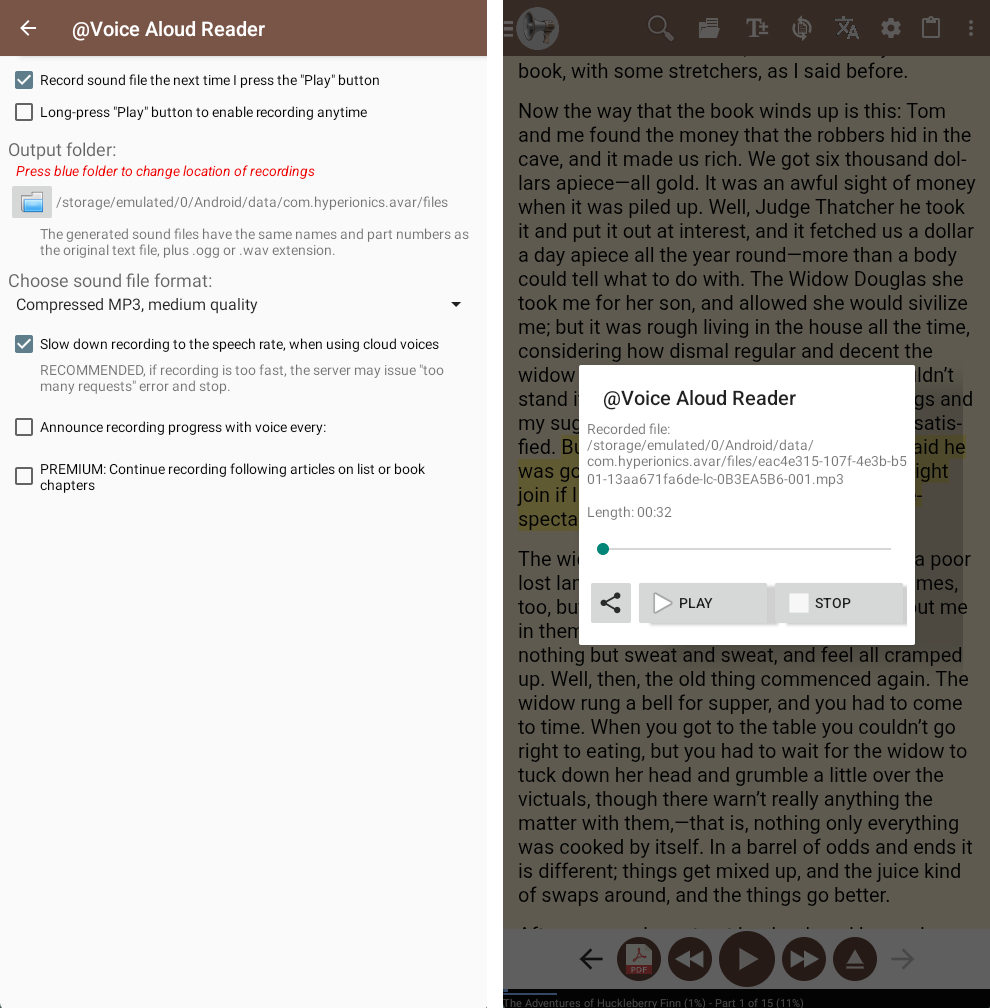
Yes. Current feature documentation mentions MP3 along with OGG and WAV recording options.
Current @Voice materials mention MP3, OGG, and WAV recording options.
Yes. Long-form recording is practical because the app is already built for long listening sessions.
Yes. Once you have the audio file, it behaves like any other audio you keep for offline playback.
Yes. Use the direct APK from Hyperionics.
If this is the workflow you were looking for, install @Voice Aloud Reader and test it with your own content in a minute or two.