Use the direct APK on de-Googled, GrapheneOS, emulator, or Play-free devices. The universal APK is the safest default build.
Why voice quality sends people searching for a new app
Users often search for a new text to speech app when what they really dislike is the voice quality of the default engine on their device.
How @Voice separates the reader from the voice engine
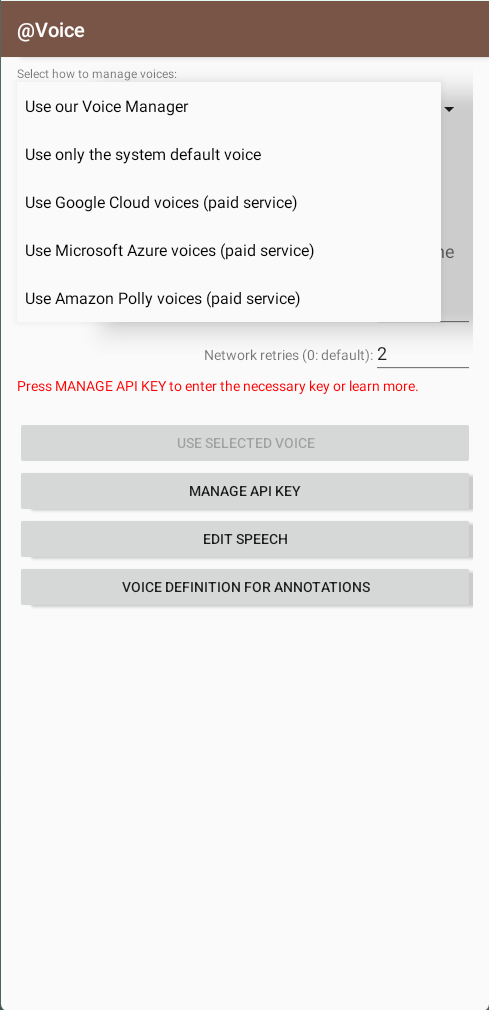
@Voice works with installed Android TTS engines and can also use optional cloud-based voices from providers such as Google, Amazon, and Microsoft where those services are configured.
What @Voice already supports: Current @Voice materials mention local and cloud voices, including Google WaveNet, Amazon Polly, Microsoft Azure, and broader voice, pitch, speed, and pronunciation control.
Switching to a better voice in @Voice
Install or configure the voice engine or cloud provider you want to use.
Select that engine and specific voice inside @Voice.
Fine-tune speed, pitch, pronunciation rules, and other playback details to match your listening preferences.
How to decide between local and cloud voices
Many people do not need a different reader at all. They need a stronger voice engine paired with a reader that already handles the content well.
Start with local Android voices if you want a simpler setup and no per-character cloud billing.
Move to a cloud voice when long sessions make the default engine sound too flat or tiring.
Keep pronunciation rules and speed tuning inside @Voice even when the voice source changes.
Why cloud voices matter mostly for long listening
Lets you keep a strong reading app while upgrading voice quality separately.
Useful for long listening sessions where voice fatigue matters.
Supports custom pronunciation rules and synced speech replacements.
Keeps voice choice flexible rather than locking you to one engine.
See it in @Voice
Example @Voice Aloud Reader screen for Cloud TTS Voices.Click the screenshot to enlarge it.
Common questions about Cloud TTS Voices
Can I adjust speed and pitch separately?
Yes. @Voice exposes practical voice control options beyond just play and pause.
Which cloud voice services can @Voice use?
Current @Voice materials mention Google Cloud, Amazon Polly, and Microsoft Azure voice options.
Can I still use local Android voices?
Yes. Cloud voices are optional, not a requirement.
Do pronunciation rules and speed controls still matter with better voices?
Yes. Voice quality helps, but tuning and pronunciation control still affect long listening comfort.
Can I install it without Google Play?
Yes. Use the direct APK from Hyperionics.
Install @Voice and try it now
If this is the workflow you were looking for, install @Voice Aloud Reader and test it with your own content in a minute or two.
 @Voice Aloud Reader