Use the direct APK on de-Googled, GrapheneOS, emulator, or Play-free devices. The universal APK is the safest default build.
Why article queues break in normal browsers
Browser tabs are a poor article queue. They reload, disappear, and break the flow when you are trying to move through several web reads in sequence.
How @Voice turns saved pages into a listening queue
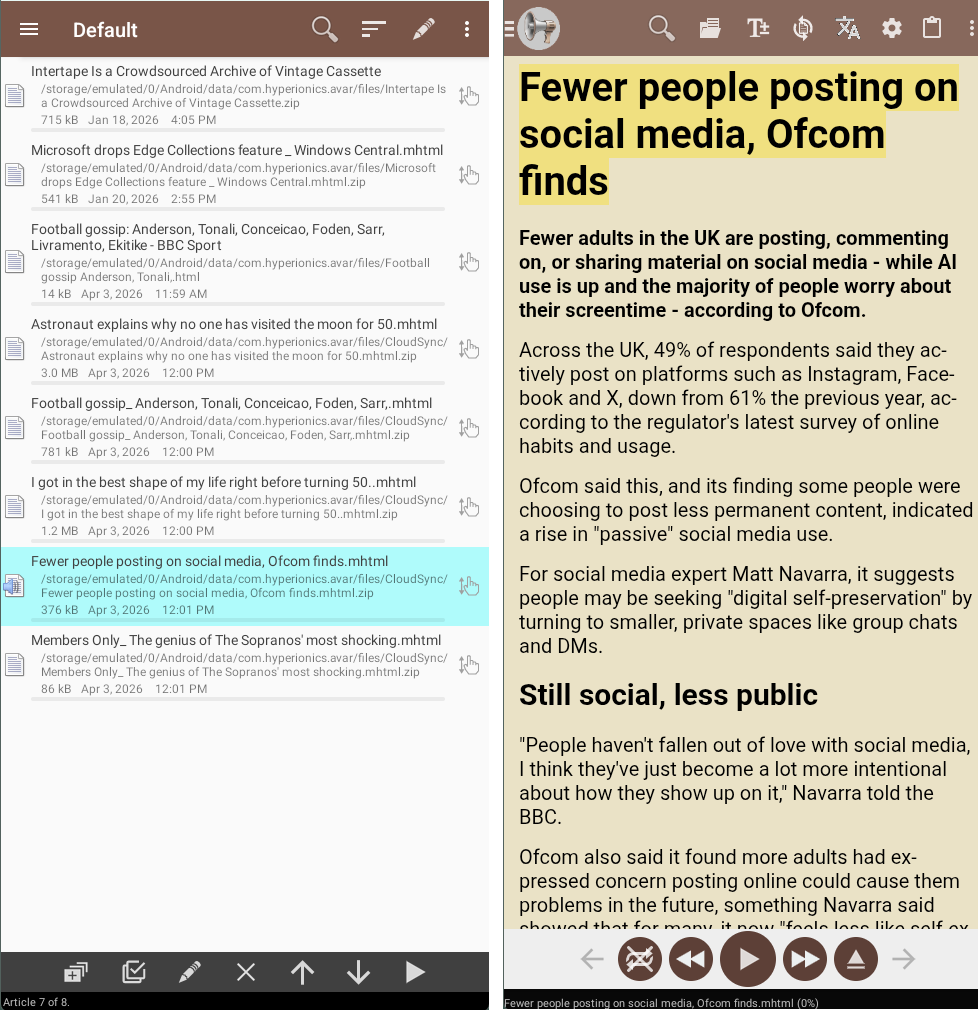
@Voice turns shared URLs and saved web pages into an article-focused queue with auto-advance, recent article history, and easier reopening of stories you already captured.
What @Voice already supports: @Voice includes shared-article capture, reading-list ordering, auto-advance, recent article history, source labels, and browser handoff from desktop and mobile.
A practical listen-later setup
Send long articles into @Voice from Share, pasted URLs, or the desktop browser extension.
Arrange the saved articles in the order you want to hear them.
Use auto-advance and recent article history to keep moving through article sessions without reopening tabs.
A realistic commute or study workflow
The strongest use case is not one article. It is collecting good material during the day, then consuming it in a cleaner audio session later.
Drop articles into @Voice from a browser or the connector when you find them, even if you cannot read yet.
Reorder the queue so the most useful or urgent pieces play first.
Use auto-advance when you want several long reads to play as one session instead of reopening each item manually.
When it works better than bookmarking or tab hoarding
Designed for web articles and essays rather than general document storage.
Works well when you want article-to-article playback from browser-captured content.
Lets you prioritize stories by reordering a saved article queue.
Keeps recent article sessions easy to reopen after you leave the browser.
See it in @Voice
Example @Voice Aloud Reader screen for Article Reader App.Click the screenshot to enlarge it.
Common questions about Article Reader App
Is this page mainly about web articles rather than local documents?
Yes. This guide is for saved web stories and article queues; local file workflows belong on the document and PDF guides.
Can I reorder saved articles?
Yes. @Voice is designed for reading-list workflows where the queue order matters.
Will @Voice advance to the next saved article automatically?
Yes, that is one of the reasons it works well for backlog listening and study sessions.
Can I reopen an article I shared earlier from history?
Yes. Recent history makes it easier to find items you already sent or opened.
Can I install it without Google Play?
Yes. Use the direct APK from Hyperionics.
Install @Voice and try it now
If this is the workflow you were looking for, install @Voice Aloud Reader and test it with your own content in a minute or two.
 @Voice Aloud Reader