Why hands-free control matters in daily listening
A read-aloud app is far less useful if it forces constant screen interaction. Search users often need reliable play, pause, skip, and bookmark control from their headset or car hardware.
Hands-Free Playback
Hands-free control is what separates a useful reading app from a desktop-style demo. @Voice pays attention to those details because many users listen while walking, driving, cleaning, or working.
Trusted by 10M+ Google Play downloads · 4.3★ on Google Play
Use the direct APK on de-Googled, GrapheneOS, emulator, or Play-free devices. The universal APK is the safest default build.
A read-aloud app is far less useful if it forces constant screen interaction. Search users often need reliable play, pause, skip, and bookmark control from their headset or car hardware.
@Voice supports wired and Bluetooth media controls, optional bookmark placement from a headset button, connection-triggered behavior, and audio-routing settings that help in real device setups.
Hands-free control is what turns read-aloud from a desk demo into something you can really use while moving, working, or resting your eyes.
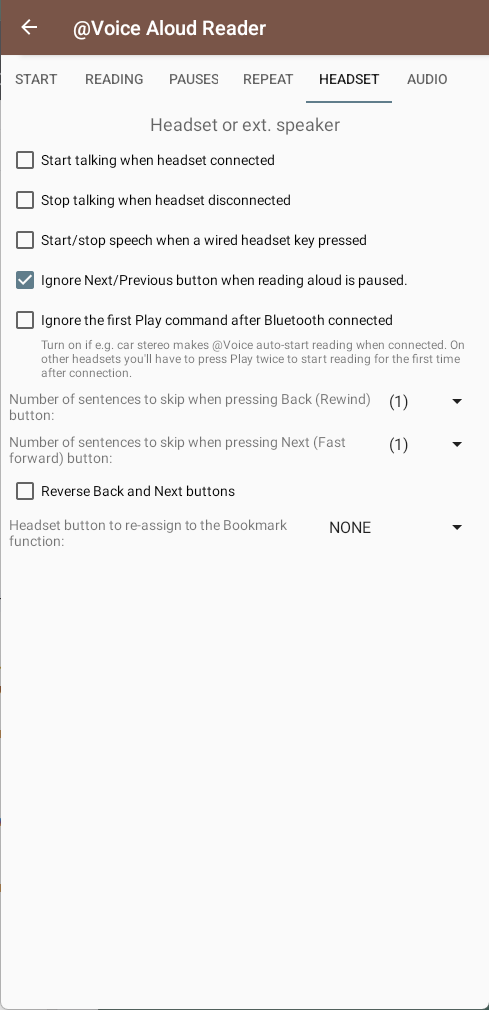
Yes. That is one of the features called out in the current app materials.
Yes. Media-button handling is one of the core hands-free features in @Voice.
Yes. Certain headset-button workflows can be used for bookmarks.
The app includes extra Bluetooth-related settings and workarounds for those real-device quirks.
Yes. Use the direct APK from Hyperionics.
If this is the workflow you were looking for, install @Voice Aloud Reader and test it with your own content in a minute or two.