Use the direct APK on de-Googled, GrapheneOS, emulator, or Play-free devices. The universal APK is the safest default build.
Why AI article workflows on Android still feel clumsy
Most AI workflows on Android still feel clumsy. You find the text in one app, copy it in chunks, switch assistants, and lose context or format along the way.
How @Voice hands the current text to your AI app
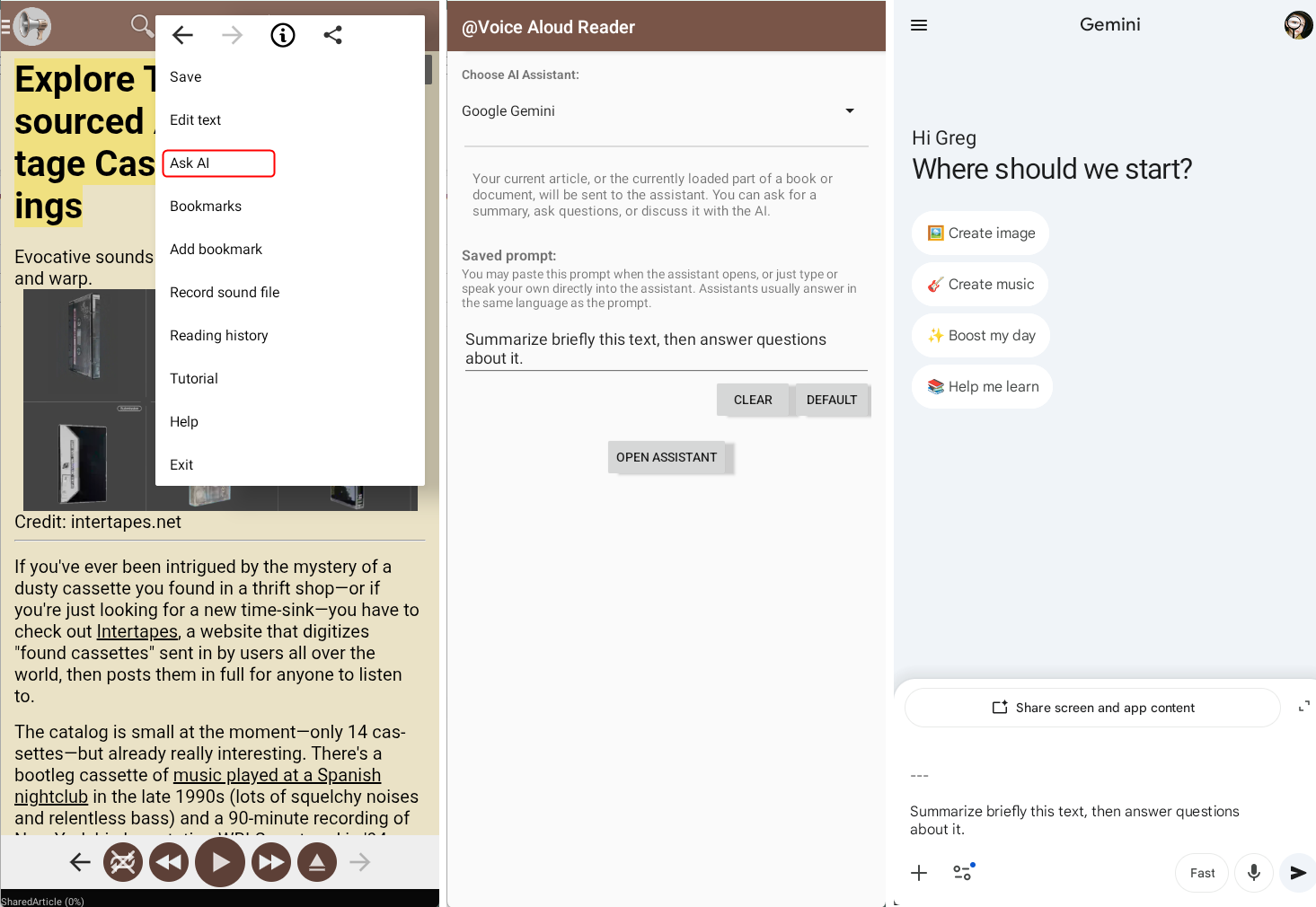
@Voice includes Ask AI so you can send the current article or the currently loaded part of a book or document to an external AI assistant, reuse a saved prompt, and choose the AI app you prefer.
What @Voice already supports: Current @Voice features list Ask AI, assistant selection for ChatGPT and other major apps, saved default prompts, clipboard-friendly workflows, large-text handling, and DRM-aware export limits.
Using Ask AI from a live reading session
Open the article, book, or document in @Voice.
Choose Ask AI from the menu or toolbar and pick your preferred assistant.
Send the text with your saved prompt so you can get a summary, explanation, or follow-up discussion faster.
When Ask AI saves the most time
The feature matters most when you already have the text open and want to move straight into summary or explanation without a manual copy-paste routine.
Use a saved default prompt when you repeatedly want the same kind of help, such as brief summaries plus Q and A.
If the text is very long, let @Voice help manage the handoff instead of guessing how much to trim manually.
Keep the AI step inside the same reading workflow so listening, lookup, and follow-up questions stay connected.
Why it is useful for summaries, questions, and study follow-up
Useful for summarizing long articles before a full listen.
Makes question-and-answer workflows easier on Android because the handoff starts from the current reading context.
Lets you keep one preferred prompt for repeated study or research tasks.
Respects DRM limits instead of ignoring protected-book restrictions.
See it in @Voice
Example @Voice Aloud Reader screen for Ask AI About Articles.Click the screenshot to enlarge it.
Common questions about Ask AI About Articles
Which AI assistants can @Voice send text to?
Current feature documentation lists ChatGPT, Claude, Google Gemini, Microsoft Copilot, Perplexity, and Lumo by Proton among the built-in choices.
Can I choose which AI app receives the current text?
Yes. Assistant selection is part of the Ask AI workflow.
Can I save one default prompt instead of typing it every time?
Yes. Current feature docs mention a saved AI prompt for repeated use.
What happens if the text is very long or DRM-protected?
Large-text handling and DRM-aware limits are both explicitly part of the current Ask AI design.
Can I install it without Google Play?
Yes. Use the direct APK from Hyperionics.
Install @Voice and try it now
If this is the workflow you were looking for, install @Voice Aloud Reader and test it with your own content in a minute or two.
 @Voice Aloud Reader